Want to build your own 24/7 FAQ knowledge base?
LibraryH3lp subscriptions
include unlimited independent internal or public-facing
knowledge bases.
Search the LibraryH3lp Knowledge Base
Does the FAQ module support other languages besides English?
You have full control over the language used and the wording of everything in your FAQ. Below are a few advanced FAQ template customizations.
To customize the 'contact us' link (located at the bottom of the page) add this to your base.html template somewhere within the BODY element:
<div id="contact-us" style="display:none">Custom text</div>
To customize the 'ask us' button in the instant search results, add this to your base.html template somewhere within the BODY element:
<div id="ask-us" style="display:none">Custom text</div>
To customize the 'All' topic in the search.html template, update the 'All' wording in the #current-topic element then add this to the base.html template:
<div id="all-topics" style="display:none">Customization</div>
The language in the other elements can easily be changed by editing the templates. This can be done in either the administrative dashboard or through in-place editing. However, using in-place editing may be the preferred method in this case.
When using in-place editing, hover over the section you would like to edit and the templates that are responsible for that area will be shown. Note, most sections have more than one template, each controlling a different component.
Pictured below is a screenshot of the browse.html template which is responsible for the language in the re-order results dropdown:
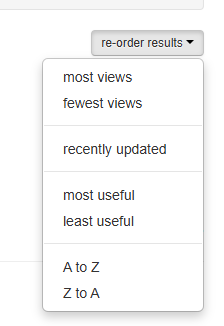
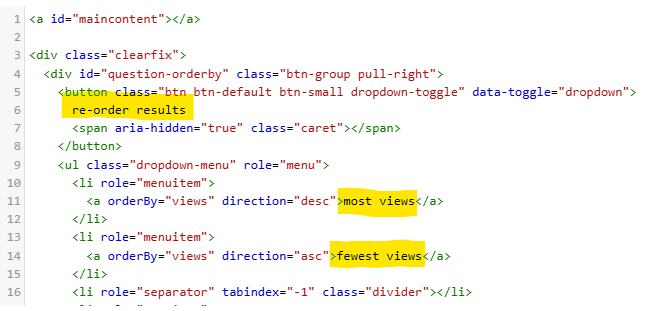
Notice that the wording options are in black text. To change the language, simply delete the English wording and add in the correct text in your preferred language.
Remember, you can create an unlimited number of FAQ sites allowing you the option to duplicate FAQ content in multiple different languages if desired. We also offer a design service which customizes your FAQ's templates to coordinate with the look and feel of your website so that the FAQ feels like a natural extension of your website. We can also import any existing FAQs you have from other sources. Both services are offered free of charge. Simply send us an email to submit this request.
FAQ URL:
More Help
Search By Topic
Stay Connected
